Hindi Font Conversion Errors: Fixing Matras, Reph and Broken Characters
Why Kruti Dev and Unicode conversions put ि and र् on the wrong letter, show boxes or English letters, and how to fix each problem.
For the full paste-and-font workflow, follow the illustrated Unicode (Mangal) to Kruti Dev 010 guide. You can test a corrected passage in the Kruti Dev 010 converter or use the Mangal converter when your source is a Mangal document.
Most Hindi font conversion problems come from a handful of causes. Once you know them, you can usually tell from one glance at the output what went wrong.
This guide covers conversions between Kruti Dev 010 and Unicode (Mangal, Nirmala UI and other Hindi Unicode fonts).
1. The ि Matra Sits on the Wrong Letter
What you see: स्थिति comes out as सि्थति, or चित्र as चत्रि.
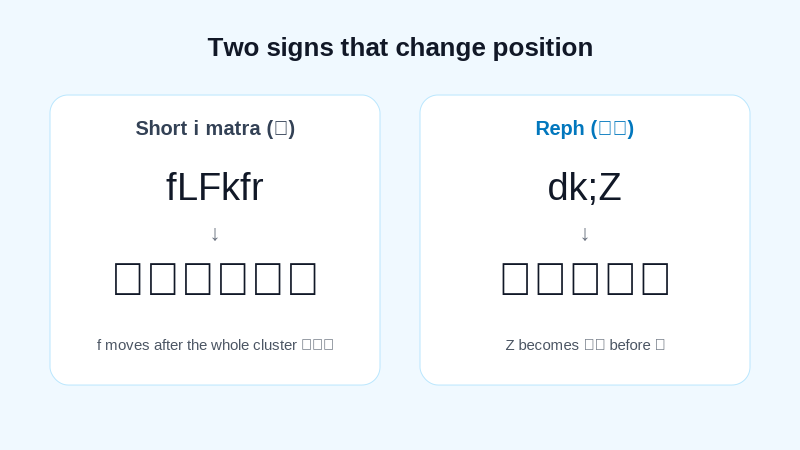
Why: Kruti Dev stores the short i matra before the letters it belongs to, because that is where it appears on screen. Unicode stores it after them. A converter has to move it past the whole consonant cluster, not just one letter:
| Kruti Dev | Correct Unicode | Typical wrong output |
|---|---|---|
fLFkfr |
स्थिति | सि्थति |
fØ;k |
क्रिया | कि्रया |
fiz; |
प्रिय | पि्रय |
Fix: Use a converter that handles clusters. The converters on this site move ि after the complete cluster, including rakar (्र) and half letters.
2. The Reph (र्) Is on the Wrong Letter
What you see: कार्य becomes काय्र, or धर्म becomes धम्र.
Why: In Kruti Dev the reph glyph Z is typed after the syllable it sits on: कार्य is dk;Z. In Unicode, र् comes before that syllable. If the converter just swaps Z for र्, it ends up in the wrong place.
Fix: The reph must move back across any matras and half letters to the start of the cluster. For कर्त्तव्य (dÙkZO;) it has to skip the whole त्त cluster.
3. Boxes, Question Marks or Dotted Circles
Boxes (□) or question marks: the program has no font that can show Hindi Unicode. Pick a Unicode Hindi font such as Nirmala UI, Mangal or Noto Sans Devanagari.
Dotted circles (◌ि, ◌ं): a matra or sign appears without a letter before it. This usually means the source text was damaged, often by copying from a PDF, or that a legacy font other than Kruti Dev was converted.
4. The Result Is English Letters
What you see: Hkkjr instead of भारत.
There are two common causes:
- The text is still Kruti Dev and a Unicode font such as Mangal has been applied to it. Convert the text first.
- You converted Unicode → Kruti Dev by mistake. Swap the direction.
The converters on this site warn you when the input looks like the other encoding and offer to switch direction.
5. English Words Turned Into Hindi
Kruti Dev has no English letters of its own: every letter key draws a Hindi shape. So “Hindi” in a Kruti Dev document is drawn as a string of Hindi glyphs.
- Kruti Dev → Unicode: select only the Hindi parts of your document before converting.
- Unicode → Kruti Dev: English letters are kept as they are and listed under the converter. Set them in a separate font such as Arial after pasting.
6. श and ष Are Missing or Wrong
Microsoft Word’s smart quotes option changes ' and " into curly quotes. In Kruti Dev those keys are श् and ष्, so words like देश (ns'k) are damaged as you type.
Our converter treats curly quotes in Kruti Dev input as ' and " and tells you it did so. To prevent the problem, turn off smart quotes in Word’s AutoCorrect options while typing in Kruti Dev.
7. Half Letters Show a Visible Halant (्)
Some letters, such as ट, ठ, ड, ढ, द and छ, have no half form in Kruti Dev. When Unicode text contains a half form of these letters that Kruti Dev has no glyph for, it is written with a visible halant (~), for example V~ for ट्. This is how a typist would write it too, and it is not an error.
Common conjuncts with these letters, such as ट्ट, ड्ड, द्ध and द्य, have their own Kruti Dev glyphs and do not need a halant.
8. A Few Characters Are Left Unchanged
Some characters have no equivalent in the other encoding: ॐ, ॠ, some Marathi and Sanskrit signs, and English letters in Kruti Dev. Rather than guessing, the converter keeps them as they are and lists them, so you can retype or replace them by hand.
Still Stuck?
Send us the word with the input you used and the output you expected. You can also read how the engine is tested on the conversion accuracy page, or try the Kruti Dev to Unicode converter again with a short sample.